Wake On Lan Command Line
Looking for wolcmd for OS X - try here
 Wake on Lan Command Line
The command line tool wolcmd is run
from a dos prompt. The syntax is as follows:
wolcmd
[mac address] [ip address]
[subnet mask] [port number]
you can also do a local broadcast if
you are running on an internal network thus
wolcmd
[macaddress] 255.255.255.255
255.255.255.255
where mac address is the
unique address of the network card. To find the mac address of a card you
can either open the computer and read the address on the sticker on the
card or much easier is, if you are using TCP/IP, ping the machine from a
dos prompt (ping [machine name or ip number] i.e. ping delphi or ping
10.43.43.43) then issue an arp command (arp -a) which will list the ip
number and physical address of the card.
If the port number is not
specified it will default to port 7
Running from a batch file
Simply add multiple entries thus:
wolcmd 009027a324fe 195.188.159.20
255.255.255.0 8900
wolcmd 009024a731da 212.86.64.31 255.255.255.0 8900
wolcmd 009024a731da 212.86.64.31 255.255.255.0 8900
To run the batch file, say half an hour
before everybody gets into work, use the AT command on a Windows NT
computer.
The AT command schedules commands and
programs to run on a computer at a specified time and date. The Schedule
service must be running to use the AT command.
What does
it look like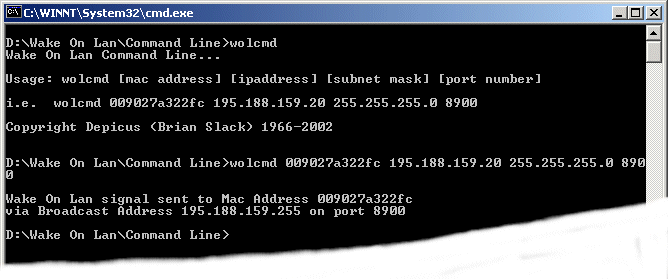


0 comments:
Post a Comment